Share


Martin Daly, technical director at Cadcorp, explains how releasing the OS National Geographic Database (NGD) compares to the development of the OS Data Hub.
Five years ago, I contributed a post to the Ordnance Survey's blog, entitled "Bringing the OS Data Hub to Desktop GIS". I finished it by saying:
"OS have invested a great deal of time and effort in the OS Data Hub, and we at Cadcorp have no doubt that it is a practical, sensible and desirable way of delivering OS data, and that it is here to stay."
That clearly remains the direction of travel. The investment in time and effort was just the beginning. The scale of change involved in releasing the OS National Geographic Database (NGD) arguably dwarfs that of the development of the Data Hub.
Lessons from history
Without the right tools there is a danger that end users of OS data, especially those without highly technical knowledge and/or the time to familiarise themselves, will be left behind.
We've seen this happen in the past with OS MasterMap Topography Layer (henceforth Topo). That was an extreme culture shock for many. Even the size-on-disk of the data proved frightening, let alone the more-or-less compulsory use of a spatial database, plus 'Change-only Updates'.
Over time, thanks to the tools provided by OS's partners, and, frankly, the inevitability of the industry having to follow OS's lead, we got there.
Similar, but different
The move from Land-Line NTF to Topo GML was notable for adding 'feature types' and attributes. OS NGD takes this even further.
NGD's primary classification is by nine themes, eg Address, Buildings, Land, Transport, etc. Below this come collections (groupings of related feature types, eg "Water Network"). At the bottom is the feature type, which is when geometry makes an appearance, eg "Building Line", "Structure Point", etc.
Each of these feature types has a large set of attributes, at least two or three times as many as Topo. These make the NGD an incredibly powerful dataset for many more use cases, including complex analysis. This is a step up from Topo, which was often used as the world's most detailed, highest quality, background map.
Different, but similar
Presenting this Cambrian explosion of feature types and attributes in a way that allows both casual and advanced use is ... not trivial. There are also three methods of delivery: an OGC API - Features service (OS NGD API - Features); an OGC API - Tiles service (OS NGD API - Tiles); and a download service (OS Select+Build).
Thanks to the existing extensive support for the Data Hub, there's already a home for the OS NGD API - Features and OS NGD API - Tiles - the OS (GB) Data Hub page of the SIS Desktop Add Overlay wizard:
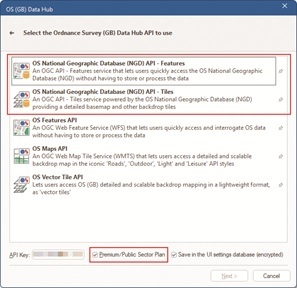
OS NGD API - Features
Next takes you to the OS NGD API - Features page:
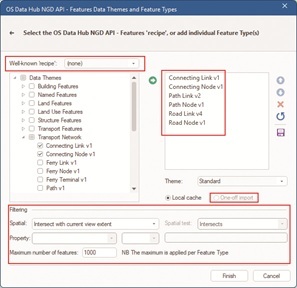
Here feature types are categorised by theme, and expanding a theme shows the individual feature types. The list on the right has been populated by 'ticking' feature types, then adding them.
Note
The Transport Network theme has a lot of feature types some of which have been updated since first release (cf the 'vX' on the end of the name). So far these updates have mostly been adding more attributes, on top of the already extensive set, making the NGD features even more useful.
After choosing feature types, the user can decide to filter the request. The default is to limit the requests to the current map view. Other options allow a pre-selected feature, eg a Flood Zone, to be used with an Intersect test. There's an absolute limit on the number of features per feature type because the NGD API - Features is not intended for bulk downloading.
This is very similar to what SIS Desktop can do with the OS Features API. But. There is a huge advantage because the new API allows SIS Desktop to request the 'queryables' (the set of attributes that can be used for queries), and the fixed set of well-known values for those attributes. So SIS Desktop can offer trivially easy query-building:
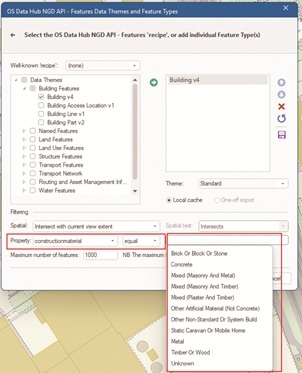
There are a host of use-cases, eg:
• Find multi-storey car parks
o eg for fire services to assess risks following the October 2023 fire at Luton airport
• Find self-contained basement flats
o eg to query against flood risk
• Find areas of grass
o eg as a starting point for a grounds maintenance dataset
OS NGD API - Tiles
The NGD API - Tiles wizard page is simpler:
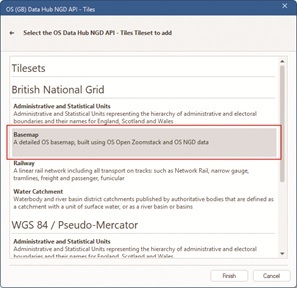
Pick the Coordinate Reference System to use (British National Grid or Google Maps-like WGS84 / Pseudo Mercator), and then the 'Tileset'. The Basemap Tileset will be widely-used, so probably start there.
Putting it all together
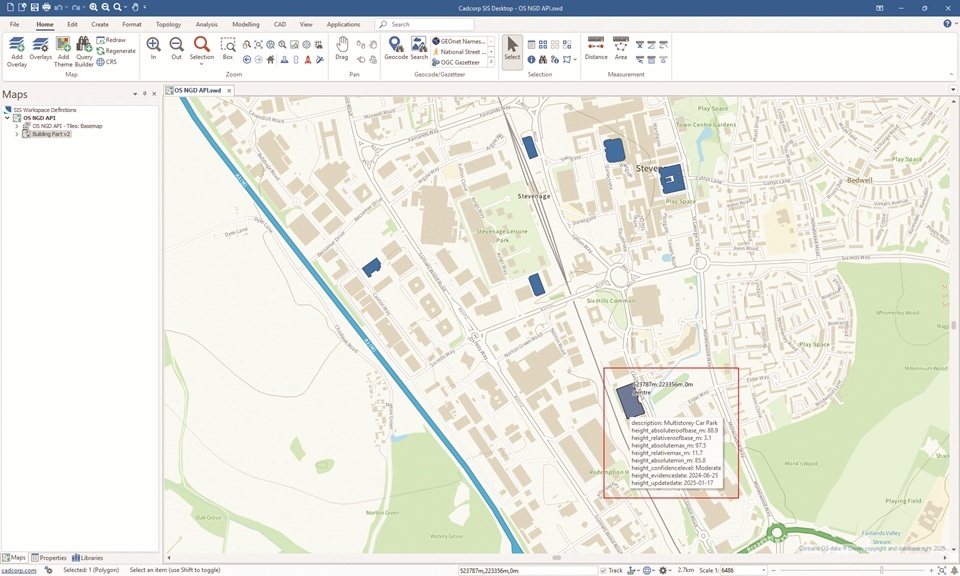
Here's SIS Desktop showing the Basemap Tileset from the NGD API - Tiles centred on the Cadcorp office in Stevenage, with multi-storey car-parks queried from the NGD API - Features. The MapTip® shows the height-related attributes - a tiny sample of those available:
OS Select+Build
The NGD API - Tiles and NGD API - Features are extremely useful and extremely powerful, but not suitable for all use-cases. In particular, large and very large volumes of data are best downloaded using Select+Build.
OS have provided really good documentation on how to use Select+Build, and you should definitely start there.
What you get from Select+Build is one or more data files. For most feature types, the natural format will be OGC GeoPackage. You might want comma-separated values (CSV) if your data is point-based, eg addresses, and your workflow uses spreadsheets (there will be limits on the number of rows that you can use in practice), or involves loading into a non-spatial database.
The Transport theme consists of almost forty feature types - and therefore GeoPackages. Managing that many files isn't always easy, so SIS Desktop provides a utility to merge them. Even then, the tables have complex relationships, with, for example topological "Links" joined to "Nodes" (by the new osid attribute).
SIS Desktop is able to rebuild the topological Transport and Network themes just by pointing the Add Overlay wizard at a merged GeoPackage file, or a folder full of related files, giving you a routable network.
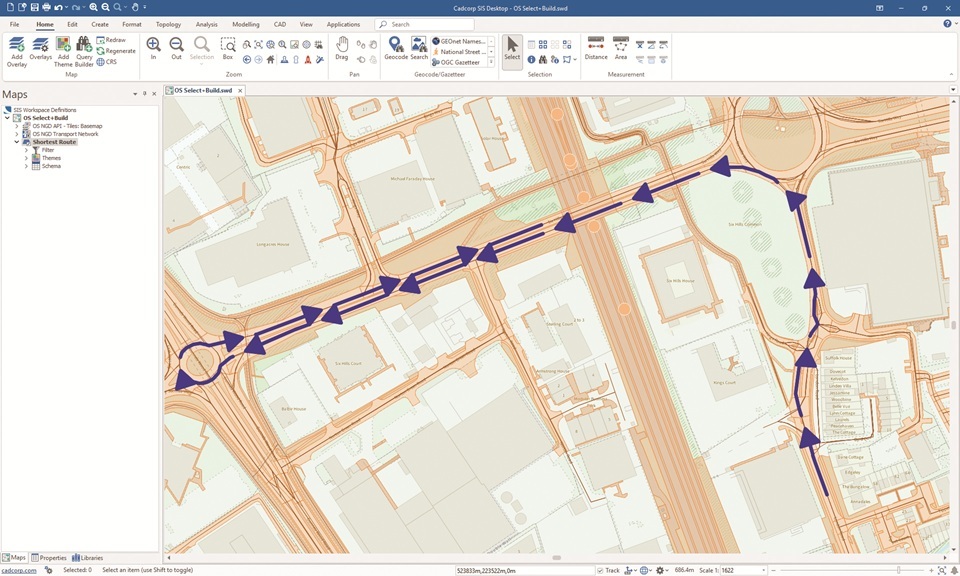
Here's a trivially simple route on the network, again in Stevenage (with the data loaded from multiple files in a folder, in the standard styling, plus NGD API - Tiles in the background - faded to make the features 'pop'), showing that the network is fully connected, with restrictions, eg one-way, etc:
Summary
If you are not using the NGD, either via the APIs or via Select+Build downloads, then there is no time like the present. Having tools that make either route familiar and easy-to-use will make your transition smoother.
Like the last time, there's no doubt that OS's investment has been significant, and also no doubt that NGD will be the basis of increasing numbers of OS products, with diverse means of access, now and in the future.
“The OS National Geographic Database represents a significant step forward for OS and its customers, offering more current and attribution-rich data than ever before. It’s great to see partners like Cadcorp providing this level of in-software support.”
- Dean Paulley, Head of Data Products, Ordnance Survey
Subscribe to our newsletter
Stay updated on the latest technology, innovation product arrivals and exciting offers to your inbox.
Newsletter